


1xBet South Africa


The popular South African bookmaker offers to place a bet on sports not only from its website but also through the official 1xbet app. You can download it absolutely free from the gaming platform's resources. The 1xBet mobile software offers visitors a range of features not found on the website, such as very convenient one-click betting or fingerprint login, making authorization incredibly secure and the bookmaker account maximally protected from intruders. We downloaded the operator's application, tested it for several days, and now offer you our detailed review of the software, covering all the nuances of using it.
1xBet Application on Android
The 1xBet app for Android is available for download via a direct link from the bookmaker's official website. The software is absent from Play Market due to Google's restrictions on gambling software. Downloading is possible from both the mobile and desktop versions of the gaming operator's resources. The software is provided absolutely free.
1xBet App Download Steps for Android
To perform the 1xBet download Android option, you need to follow these steps:
- Open the bookmaker's website from your mobile phone.
- Scroll down to the bottom of the homepage.
- Click on the Android operating system logo.
- Confirm the download of the program to your phone.
You can also download the software from the bookmaker's desktop site. To use download 1xBet app from the desktop resource, you need to:
- Visit the operator's resource from a PC.
- Click on the phone icon at the top of the screen.
- Find the green button with the Android logo.
- Click on the square to the right of it.
After this, a QR code will appear on the screen. You need to scan it with your mobile phone's camera and confirm the software download.

1xBet Android App Setup Instructions
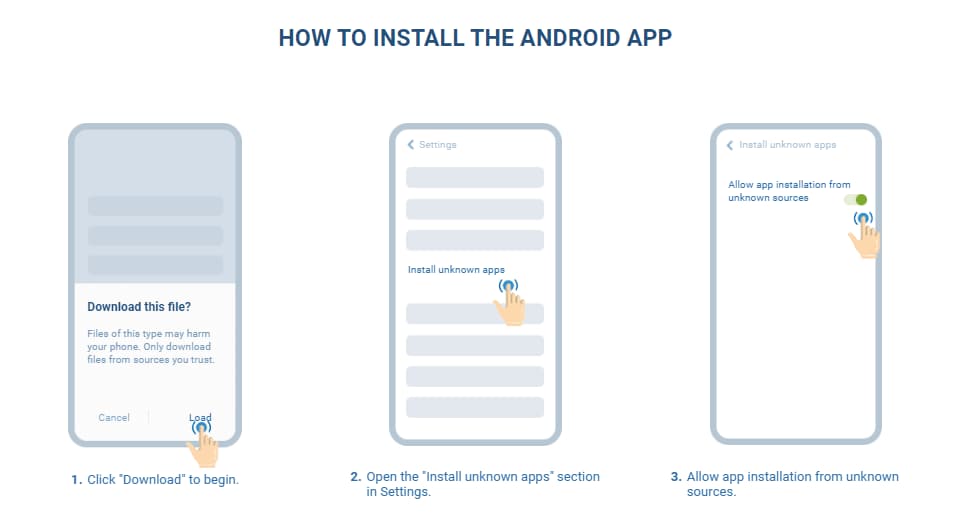
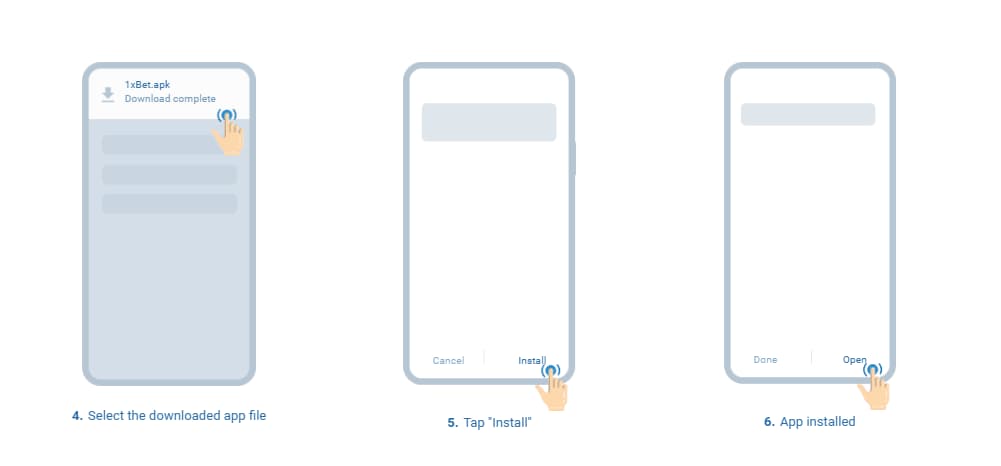
When the 1xBet APK download is complete, the operating system will prompt you to launch it. You need to agree to this prompt and wait for the software installation to finish. Once it's complete, you can use the software.
However, it's worth noting that not everything is as simple as it seems — every user has a significant risk of encountering problems when launching the downloaded 1xBet APK. The difficulties are due to the fact that the installer is not downloaded from Play Market, and by default, smartphones block the installation of software from outside the store. If you cannot install the software, you need to:
- Go to your smartphone settings.
- Find the "Security" section.
- Select "Advanced," then "External sources."
- Find the file manager in the list.
- Allow it to install software from outside the store.
Then you need to find the 1xBet APK in your phone's memory and launch it manually.
System Needs for Android
Here are the minimum system requirements for the Android app of the popular international bookmaker.
| Operating System | Android 6.0 and above |
| Processor | Any |
| RAM | 2 GB and above |
| Storage | Minimum 215 MB of free space |
| Internet Connection | Stable (Wi-Fi, 3G, 4G, 5G) |
| Screen Resolution | Any |
Before using the download 1xBet APK option, make sure your device meets these requirements, otherwise, the software may not work correctly or may not run on the smartphone at all.
1xBet App for iPad and iPhone
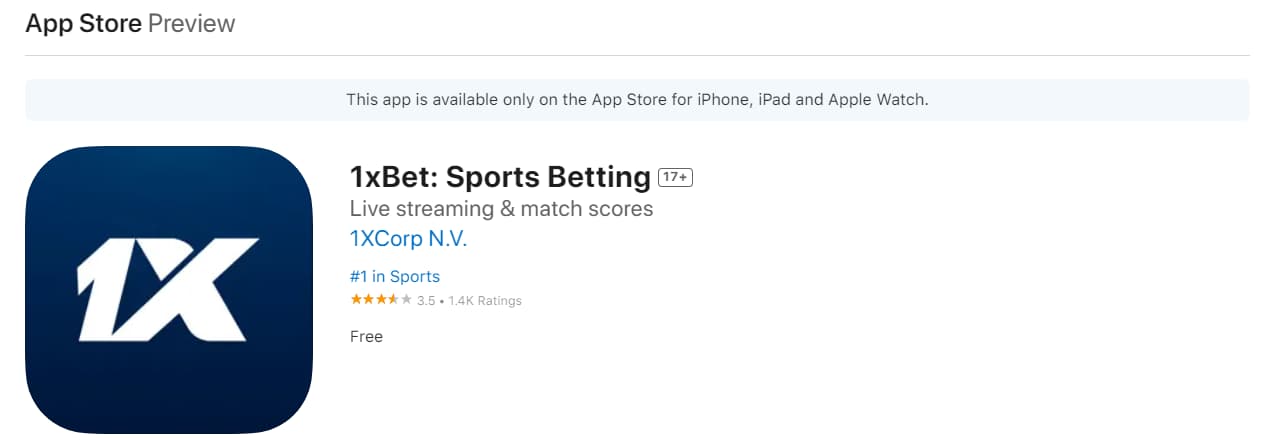
The bookmaker also has software for Apple devices. It does not differ in functionality from the Android version. Currently, operator clients can make use of the download 1xBet mobile app option from the App Store. Downloading the software from the store is absolutely free. If a user cannot find the software page, they can follow the link from the bookmaker's official website. It is located in the app section, which opens by clicking on the link at the bottom of the screen in the mobile version or on the phone icon on the desktop.

Process to Download the App on iOS
To use the 1xBet download iOS option, you need to follow these steps:
- Go to the App Store.
- Enter "1xBet" in the search.
- Open the software page.
- Click "Download."
After that, you just need to wait for the software to finish downloading.
iOS App Installation Guide
For the bookmaker's software, there is no separate installation procedure. As soon as the user clicks "Download," the download 1xBet process begins, followed by automatic installation. No additional actions are required for it.
Technical Requirements for 1xBet on iOS
Below is a table with the minimum system requirements for the bookmaker's mobile software.
| Operating System | iOS 12.0 and above |
| Processor | Any |
| RAM | 1 GB and above |
| Storage | Minimum 350 MB of free space |
| Internet Connection | Stable (Wi-Fi, 3G, 4G, 5G) |
| Screen Resolution | Any |
Since apps in other countries have their own specifics, we have written the following reviews:
Main Functions of the 1xBet App
The 1xBet mobile app offers bettors impressive features, making the process of sports betting as enjoyable, safe, and unparalleled as possible. We have carefully studied all the software options and prepared a small overview of the main ones, detailing their features.
Betting on Sports
Through the app, you can place bets on sporting events. Currently, the 1xBet mobile app offers clients pre-match bets on competitions in more than 25 disciplines. In total, the software features over 2000 events across various disciplines — with such variety, a player will easily find a suitable option.
Casino
Through the bookmaker's mobile software, you can play slots on your phone. There are over 2000 slots in the application. There are also table and crash games. Additionally, through the 1xBet South Africa app, you can place bets in the live casino. The software offers a wide selection of rooms with live dealers, providing a unique gaming experience that lies between an online platform and a classic offline establishment. All entertainment is used under the provider's license, ensuring the fairest and most transparent conditions for gamblers.
In-Play Betting
In the 1xBet mobile app, in-play betting is available. The live section offers all current competitions within major world tournaments, as well as championships held in South Africa. The event listing is no less comprehensive than the pre-match one.
Virtual Sports
Virtual sports are bets on events created by special algorithms. The outcome is determined by a random number generator, so these games are closer to slots. However, the 1xBet mobile app, provides an unparalleled sports betting experience that cannot be found in slot machines. Want to quickly place a bet and feel an adrenaline rush but don't want to wait for a match to end to calculate and determine the results? Then your choice is virtual sports, which offer the same experience as sports betting but take less time and do not require long waiting periods.

Betting Options
If you love sports betting and are a fan of betting, you definitely need to use the 1xBet mobile app download option. The bookmaker's software offers a huge selection of bets and related features.
Betting Instructions for the App
The first thing a user needs to do to place a bet through the official 1xBet mobile app is to register. Only those who have an account can place bets. Detailed instructions on how to become a full-fledged client of the bookmaker are provided below. Then, you need to top up your account (a guide is also provided below).
Once the money is credited to the account, which takes literally 10-20 seconds, you can start placing bets. To do this, you need to:
- Choose a match from the 1xBet mobile app lineup.
- Click on it.
- Select the appropriate market.
- Indicate the amount and type of bet in the ticket.
- Confirm the bet placement.
You can track bets in a special section of the personal account. It displays recently settled bets, as well as current bets whose results are not yet known. A link to it is on the quick access panel at the bottom of the app's home screen.
Mobile Site Version of 1xBet
The 1xBet mobile version is an adaptation of the bookmaker's website for smartphones and tablets. No additional software installation is required — just open the bookmaker's resource through any browser on your phone. The mobile version is functionally identical to the desktop version and offers the same features to users.
Mobile Version vs. Mobile App
If you can use the download 1xBet app for Android option, it is better to do so, as the software has several advantages over the mobile version, due to the presence of additional features. These include:
- One-click betting on a fixed amount;
- Biometric and PIN login;
- Push notifications about important matches.
All of this makes using the software more comfortable and secure compared to the mobile version. Additionally, the 1xBet mobile app works much faster, especially on relatively weak phones — the software opens sections and pages of sporting events more smoothly and quickly displays various menus.
Opening an Account on the 1xBet App
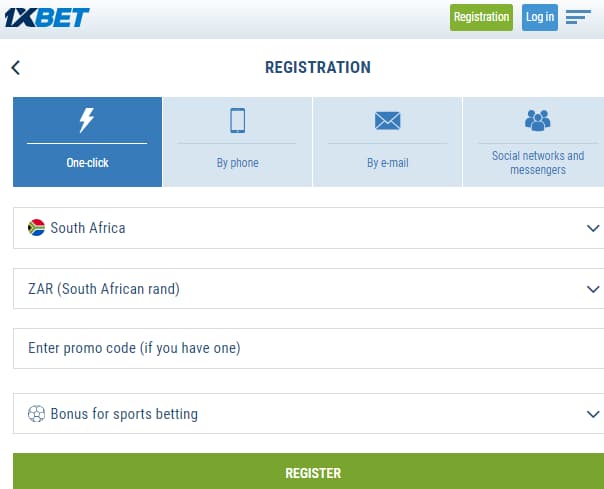
To create an account, you need to click "Registration," choose a method, enter all the details in the form, agree to the rules, and confirm the action. You can register on the 1xBet mobile app using 4 methods:
- One-click;
- By phone;
- By e-mail;
- Social networks and messengers.
Verification is not required by default. However, it may be requested at any time at the discretion of the bookmaker's administration. To verify, you need to send a document proving your identity to the bookmaker's support service. You can upload it directly through the 1xBet mobile app.
The player's data verification takes up to 72 hours but usually passes much faster. If the client provides accurate, truthful, and unquestionable information, they will be verified, after which they regain access to all the bookmaker's features and can continue to enjoy the game.
Ways to Deposit and Withdraw Funds on 1xBet App
To deposit, the 1xBet mobile app should click the "+" icon at the top of the screen, choose the payment method, specify the amount, and details, and confirm the financial transaction. The bookmaker offers an astonishing number of deposit options, all very convenient for South African residents.
But the most important and pleasant aspect for players from South Africa is the complete absence of any commission fees. Today, you can top up your balance in the 1xBet mobile app using Visa and MasterCard bank cards, AIRTM, Perfect Money, AstroPay, SticPay, and cryptocurrency. The full list of payment options can be seen on the deposit page.
As for withdrawal, it is equally convenient. To withdraw winnings from your account on the gaming platform, you need to click "Menu," then "Other," then "Account Management," and then click "Withdraw." Once all this is done, the 1xBet mobile app will ask the user to enter the amount, and details, and confirm the transaction.
The arrival time of the money depends on the selected transfer method. For example, if you specify a bank card, the winnings may take up to 3 days. If you choose a cryptocurrency wallet, the funds will arrive much faster — in just 20–30 minutes. This is definitely something to consider when making a withdrawal request.
Bonus Offers on 1xBet
Unfortunately, the download 1xBet app South Africa edition means no rewards to clients from the bookmaker. However, you can get many other attractive bonuses, provided for both new registrants and those who already have an account and play on the bookmaker's website.
What does the betting platform offer to gambling enthusiasts? Here are some profitable promotions that all clients can receive through the 1xBet mobile app:
- Welcome bonus for betting. Under this offer, you can get an incredibly attractive gift of +200% on the first deposit to your balance. Note: the maximum amount of the reward cannot exceed 3000 ZAR.
- Welcome bonus for the casino. This promo provides a top-up to the first 4 deposits totaling up to 30,000 ZAR. Additionally, you can get up to 150 free spins in the 1xBet mobile app on slots like Reliquary of Ra, Juicy Fruits 27 Ways, and Rich of the Mermaid Hold and Spin.
- Lucky Friday. Have you already registered on the bookmaker's site and spent the welcome package? No problem! Registered players have a deposit bonus available on Fridays of +100% of the deposit. The gift can be received every week!
The 1xBet mobile app supports promo codes. New clients can use them during the account creation process, and existing ones — in a special section of the personal account. DailySports provides readers with the promo code 1x_1912910, which increases the maximum bonus by 30%. The app also offers many other extraordinarily lucrative promotions. The full list of 1xBet bonus offers and their detailed conditions are published in the "PROMO" section. To access it, go to the main menu of the software and click "Other" — then the menu will open with a link to the bonus page.

Pluses and Minuses of 1xBet App
The 1xBet mobile app has both pros and cons. The main advantages of the software include:
- Speed. The app works much faster than the mobile version, making it more comfortable to use.
- Additional Features. The software offers a range of options not available on the site: one-click betting, push notifications, and biometric login.
- Absolute Free. The 1xBet app download is completely free, so nothing prevents you from trying it.
- Features. The software offers the same set of features and games as the desktop site and mobile version of the bookmaker.
- Regular Updates. New versions of the software are periodically released, making it more convenient.
As a downside, the 1xBet mobile app can be the interface, which slightly differs from the desktop one and may cause some confusion at first. However, you can be sure that you will quickly get used to it, and you will definitely like it over time.
Other apps you might be interested in
FAQ
How to activate notifications in the app?
To enable push notifications in the 1xBet mobile app, you need to call the main menu, click on the gear icon at the top of the screen, select "Push Notifications," and then move the virtual switch "Match event information." You can also activate the LED indicator and sound notifications.
Can I withdraw money through the software?
Yes, this option is available. Using the official 1xBet mobile app, you can perform all financial operations provided by the bookmaker. It is also allowed to use the same payment tools as on the official website of the gaming platform.
How to contact support through the app?
Any client can write to support through the software if they have questions or problems. To contact technical support in the 1xBet mobile app, you need to go to the main menu, and then click "Customer Support." Then you need to choose a communication method, there are four options: chat, callback, online call, and email. Important point: email support through the software is not possible.
How to update the bookmaker's software?
To update the gaming operator's software, you do not need to use the download 1xBet APK for Android option again or install the software from the App Store. It’s much simpler: just go to the menu, click on the gear icon at the top of the screen, and click "App Version." If there is an update, the software will automatically download and install it — you do not need to perform any actions for its installation.
How to get the welcome bonus in the app?
Although the bookmaker does not provide a separate reward for a 1xBet download, everyone who downloads the software can get a generous welcome package that will give a comfortable and, most importantly, financially secure start at the bookmaker. To become its owner, just choose the type of gift when registering, complete the account creation, and then make a deposit.



