




After successfully signing up on SportyBet, the next step is to log in to your account. The SportyBet login process takes less than a minute, and you can start enjoying the website's services.
This guide will outline how bettors in Nigeria and Kenya can access their SportyBet profile. We'll also show you how to manage your profile on the betting platform.
SportyBet Login Guide
Players can complete their SportyBet Nigeria login through a PC or smartphone browser or via the bookmaker's app. Kenyans can also access their accounts this way. It's a quick and secure procedure that requires you to provide a few details before gaining entry.
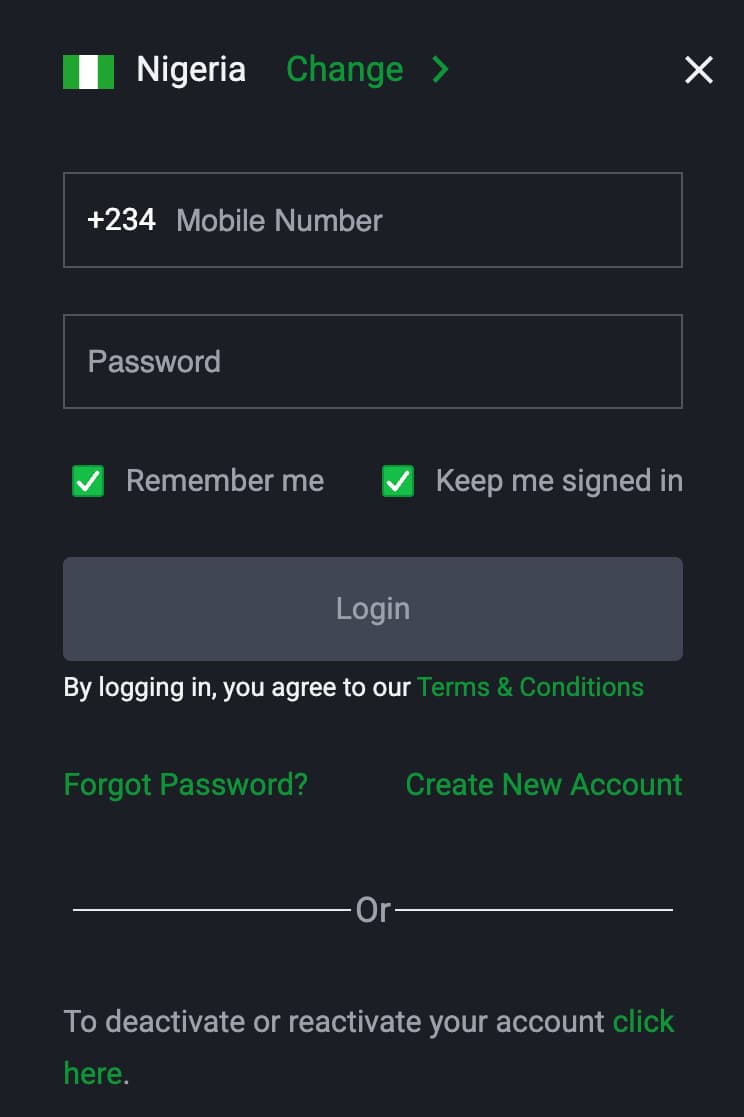
How to Access SportyBet Via Browser
Our findings show that this bookmaker offers a mobile and desktop site that can be accessed through your browser. You can log in using Chrome, Safari, Opera or any other reliable Internet browser. Follow the step-by-step instructions below:
- Enter SportyBet's URL in your preferred browser to load the homepage.
- Locate and click the “Log in” tab at the top right-hand corner of the screen.
- Enter your registered mobile number and password.
- Tick the “Remember me” and/or “Keep me signed in” box.
- Tap ‘Login’ to access your account.
The “Remember me” and “Keep me signed in” options are quite similar. They've been designed to help secure your account. With the former, the operator automatically fills in your phone number so that you won't have to type it again. However, you still need to enter your password. The latter, on the other hand, automatically logs you into your profile whenever you visit the site.
Hence, the “Keep me signed in” option is ideal for private devices, while “Remember me” is safe for personal or shared devices since it only displays your phone number.
Access Account from the App
Another alternative to accessing your account is via the mobile app. To download the application, whether on your Android or iOS device, you have to visit the betting site. There, you will find the app page in the AZ Menu section.
After successfully downloading and installing the app, follow the steps below to access your profile:
- Launch the app and confirm that you meet the legal age (18 years old).
- Click the “Login” button in the top right-hand corner of the homepage.
- Enter your mobile number and password.
- Click “Login” to complete your SportyBet Nigeria login mobile.
Accessing your profile through the mobile app has many benefits. Aside from keeping you signed into your account, you also gain access to special features. They include a notification bar for quick actions, biometric authentication, and Email 2-step verification to protect your account.
Creating a SportyBet Account
Before your SportyBet log in, you must have created an account with the bookmaker. You can do this via desktop, mobile or the app. Only after completing this step can you access the platform and engage in various betting activities.
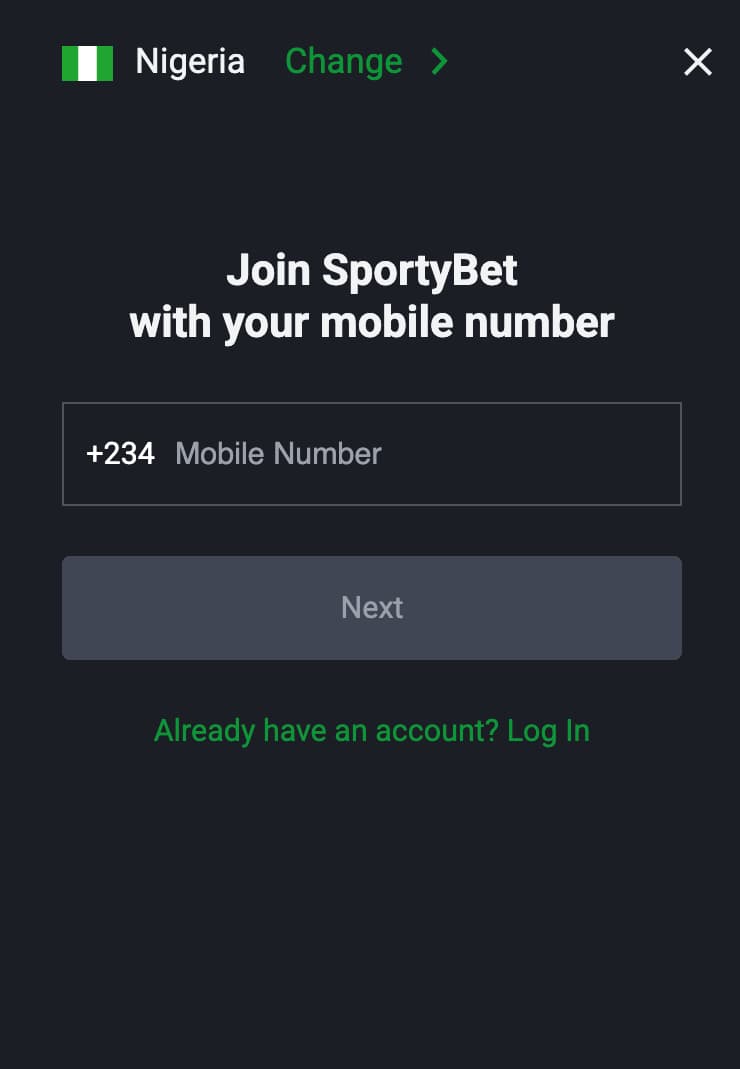
However, you must submit accurate information during sign-up, as these details will be used to log into your account.
During registration, the betting site requests your phone number and password to create your account. You will then receive a verification code via SMS on the number you submitted to finish the sign-up process.
What if I Can't Log in?
While the online SportyBet login procedure is as smooth as silk, players may still encounter issues accessing their accounts. Based on our observations, these problems can result from losing your password or an error message while signing in. Find the common issues you may face and how to solve them!
How to Recover a Lost Password
The bookie offers a password recovery feature for players who have forgotten their login details. If you're one of those, you still can't access your profile.
Visit the website and go to the login page. There, you will find a “Forgot Password?” option. Once you click it, the operator will require you to enter the phone number you provided during registration. You’ll receive a 6-digit OTP via SMS, Voice, or Telegram on that number. Input the code in the box provided.
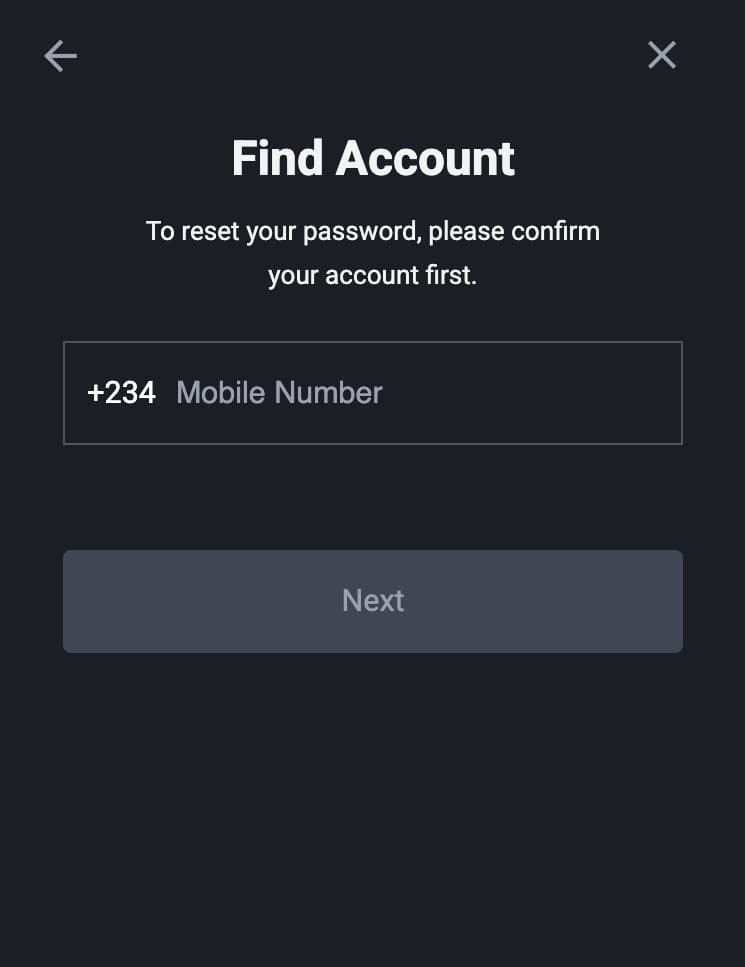
That's not all; you must also complete a password change. The betting site will let you enter a new one after entering the OTP. These become your new login details. It is advisable to write and keep your password safe somewhere so you don't have to keep losing it.
I Lost Access to My Phone Number
If you lose your phone number, you will need the assistance of customer service. The customer service representatives may ask some security questions and proof of ID to confirm that you own the account. If you pass this test, then you can request that they link a new phone number to your personal account.
Why Your SportyBet Account Was Blocked
If you experience account blocking on the platform, then there must be a reason for it. This may be a result of unusual activity in your account or if you have breached the platform's terms and conditions.
In such cases, you should contact customer support, where you can obtain answers regarding why your account was locked. If they discover that you haven't committed any offence, then you can get full authorization to use your profile again.
Error Messages During Sign-in
Error messages during your SportyBet sign in can happen for various reasons. This can be due to incorrect login details, an unstable network, a server issue, or when the site is undergoing maintenance.
Ensure that your details are accurate, and your network is stable to log in to your account. For technical issues on the part of the bookmaker, you'll need to wait until they are resolved to access your profile.
Managing SportyBet Profile
In your personal SportyBet account, you can take various actions, such as updating settings, viewing betting history, checking your balance, and depositing and withdrawing funds. To do this via the app, click on “Me.” If you’re using a desktop, tap “My Account” at the top right-hand corner of the homepage.
It's easy to navigate through the betting platform to manage your profile. The site features a user-friendly interface that enables you to do this conveniently. Additionally, you can manage your profile through both the website and the app.
Fast Response from SportyBet Team
If you ever need help with anything, the operator allows you to reach out to trained customer service representatives. They offer various channels that are available around the clock and respond to players' complaints promptly.
After signing up and completing your SportyBet Kenya login, you can use these channels. The Customer support feature is also available for Nigerian bettors. The table below highlights the customer support channels for both markets:
Markets | Support |
|---|---|
SportyBet Nigeria |
|
SportyBet Kenya |
|
FAQ
How do I log in to my SportyBet account?
To access your profile, visit the betting platform, click the ‘Log in' button and input your SportyBet login Nigeria information. The same applies to the Kenyan platform.
Can I log in to SportyBet via the mobile app?
Of course! The betting platform provides a SportyBet app login for mobile users. You can download and install the app on your Android or iOS device. After installation, open the app, locate the "Log in" button, and enter your details.
What should I do if I can't log in to SportyBet?
The betting site allows a smooth login process for all players. Use the password recovery option to regain access if you have forgotten your password. If you are unable to access your profile for any other reason, please contact customer support.
What should I do if I get an “incorrect data” message when logging in?
If an incorrect data message appears while trying to log in to your account, verify that your details are accurate. If the problem persists, please contact any of the bookie's customer service representatives.
Can I set up two-factor authentication?
Yes. You can set up email two-factor authentication in your profile settings. It provides an extra layer of security to your account.
- New Sportsbook Bonuses
- 1xBet Welcome Bonus
- Paddy Power Sign Up Offer & Promo Code
- Melbet Bonus Day
- Betwinner Welcome Bonus



