


Download Melbet App in India


Melbet brings one of India’s big betting services directly to your mobile device through its app. It is one bundle of sports betting, casino games, live betting, and more. It’s available for free download on both Android (APK) and iOS.
In this review, we’ll show you the app’s features and how to download and install it on different devices. We’ll also show you the available bonuses and why many Indian bettors prefer this Melbet app India over other platforms.
General Information About the Melbet App in India
The Melbet application works exactly as its website, but it is optimized for a smaller screen. Its key features are in this table:
| Features | Description |
| Sports | Cricket, football, tennis, basketball, esports, etc., and major leagues and tournaments available for betting. |
| Casino | Thousands of games – slots, roulette, poker, blackjack, etc. There is also a Live Casino with real dealers. |
| Live Streaming and Matches | Live betting and streaming of selected matches. |
| Available Bonuses | Generous welcome bonuses for new players. Regular promotions (free bets, reload bonuses, cashback offers, exclusive mobile bonus, etc.). |
| Notifications | Push notifications for match results, bet status, new promotions, and special offers. |
| Transaction Security | Secure payments with SSL encryption. Supports two-factor authentication. Licensed and regulated. |
| User-Friendly Application | Smooth performance, modern design, and easy navigation. |
| Convenient Banking Operations | Fast deposits and withdrawals with multiple methods. |
Download the Latest Melbet APK for Android
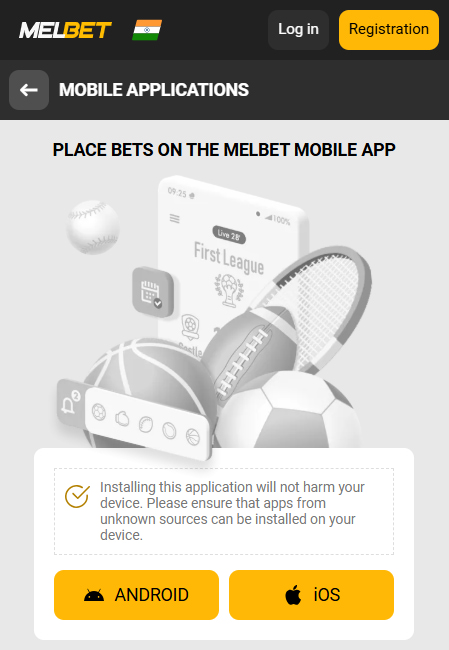
The Melbet APK download is free on the website since it’s not on the Google Play Store.
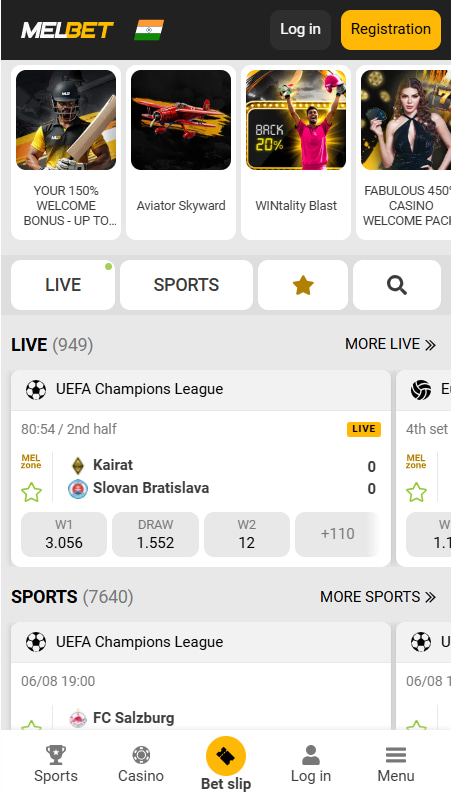
All markets on the website are also on the app – including sports, live bets, and casinos. Navigation is via a simple menu – you can quickly switch between sports events, check live scores, or play slot games. Live streaming and push notifications are also available.
It is faster than the mobile website. It also provides secure login options – PIN or biometric authentication.
Step-by-Step Installation of Melbet APK
- Open your mobile browser and visit Melbet. Scroll to the very bottom of the homepage and select Available for Android.
- Confirm the download prompt and the APK file will start downloading.
- While the APK downloads, go to your phone Settings > Security (or Privacy) and enable “Install unknown apps” for your browser or file manager.
- Once the APK file is downloaded, tap on it and select Install. The app will install on your device within a few moments.
Melbet Android App System Requirements
Before Melbet APK download for Android, ensure your device meets these minimum system requirements:
| Parameter | Requirement |
| Operating System | Android 5.0 or higher |
| Free Storage Space | 50–100 MB free space |
| RAM | Minimum 1 GB |
| Processor | 1.2 GHz or faster |
| Internet Connections | Stable 3G/4G or Wi-Fi |
| Permissions | Allow installation from unknown sources |
Any smartphone from the last 5–6 years should be able to run the Melbet sports betting app without issues.
Melbet App on iPhone and iPad
The Melbet iOS app is available on the App Store. It has a similar interface to the Android version, adapted for iOS devices. You can access all sports markets on your iPhone. You can also enable gesture navigation and Touch ID/Face ID for quick login and security.
The graphics are crisp and smooth, and you can get push notifications, just like the Android app.
Melbet’s iOS app is easy to install and update (directly from the App Store).
How to Set Up Melbet on iPhone
Here’s a quick step-by-step guide to Melbet download on iOS and install it:
- Go to the App Store.
- Tap the search icon and type “Melbet”. Look for the app titled “Melbet Sports Betting India” (it should have the Melbet logo). Or you can tap the iOS download link on the website, which will redirect you to the App Store listing.
- Tap Get or the cloud download icon. It will download the Melbet mobile app and install in just a few seconds.
Minimum iOS Version Required
Ensure your Apple device meets these minimum requirements for the Melbet iOS app to run properly:
| Parameter | Requirement |
| Operating System | iOS 12.0 or higher (iPhone) |
| Free Storage Space | At least 100 MB free space |
| RAM | Minimum 1 GB |
| Internet Connection | Stable Wi-Fi or 4G/5G mobile data |
| Compatible Devices | iPhone 6s or newer |
How to Keep the App Up to Date
Updating on Android: Since the Android app is not from the Play Store, it doesn’t auto-update through Google Play. Melbet may prompt you when a new version is available. You have two ways to update:
- Automatic (in-app): You might be prompted for updates in some cases. If you are notified in-app to update, follow the prompts to download and install the new version.
- Manual (re-install): The surest way is to download the latest APK from the official site whenever an update is released. You can check the website for the latest version.
Updating on iOS: If you installed via the App Store, updates are very easy:
- If you have automatic updates enabled on your iPhone, the Melbet app will update whenever a new release is available.
- If not, you can check manually: go to the App Store, tap your profile icon, scroll to updates. If Melbet appears in the list, tap “Update”.
- Alternatively, simply search for Melbet in the App Store. If an update is available, you’ll see an “Update” button instead of “Open”.
Download Melbet for PC
Melbet also has a desktop application for PC (Windows) and Mac.
The desktop app is just as the website but often runs faster since it’s not constrained by browser performance. The interface is similar to the web version, but you might notice smoother navigation because the data is cached in the app.
You don’t need to constantly log in. Once installed, you can save your credentials securely and log in faster.
How to Download and Install on PC
- Open your web browser on the PC and visit Melbet. Look for an “Applications” or “Download for PC” link.
- Click on the section for downloads and select the Windows app option.
- Click the download button for Windows and save the installer to your computer.
- Locate the downloaded file and double-click it. The Melbet setup wizard will launch.
- Choose your preferred language if prompted, and follow the on-screen instructions to install.
Desktop App Update Instructions
In-App Update: Often, when you launch the Melbet PC app and a newer version is out, it will prompt you to update. Follow any on-screen prompts to download and install the update.
Manual Update via Download: If the app doesn’t auto-update, you can download the latest version from the site.
Using Melbet in Mobile Browser
Melbet’s mobile website is an excellent alternative to the app. You can access Melbet through any mobile browser without any download.
Features of the Mobile Version:
- You can register or log in, deposit money, and place bets on all sports.
- The mobile site also has casino games, live casino, and other sections – e.g. promotions and support.
- It has an adaptive layout.
- Its design is simple.
- No installation is needed, and you’re always accessing the latest version of the site.
- It’s great for quick access or on devices where you cannot install apps (e.g., someone else’s phone or a work device).
Mobile Site vs. Desktop Site: The mobile site is simply the desktop site rearranged for a small screen. All betting markets and casino games are available, but you might find the PC desktop site easier for heavy usage due to the bigger screen. Still, the main benefit of the mobile site is that it is flexible – it works on any device without any download.
Comparing the Melbet App and Mobile Site
To help you decide whether to use the Melbet betting app or the mobile website, we compared them side-by-side:
| Aspect | App | Site |
| Availability | Dedicated app for Android (APK) and iOS (App Store). Requires download & install. | Can be accessed via any web browser on mobile. |
| User Experience | Smooth, intuitive navigation and faster loading times. Can use device features (touch ID, notifications). | Full functionality, but might experience slightly slower page loads, depends on browser performance. |
| Speed & Performance | Very fast loading of odds and graphics. | Good, but page load can be slower, especially on slower networks. |
| Installation & Storage | Requires installation (takes ~50 MB space). | No installation required. No storage space used except cache. |
| Security | Has advanced security. Verified by Melbet. | Secure connection but relies on browser security. Protected by Melbet’s SSL encryption. |
| Push Notifications | Yes. | No. |
| Offline Access | Limited. | No. |
| Updates | Must update for new features. | Always updated. |
| Convenience | One-tap access from home screen; stays logged in (if you choose). | Convenient for quick use or if you can’t download an app. |
Sign Up in Mobile Application
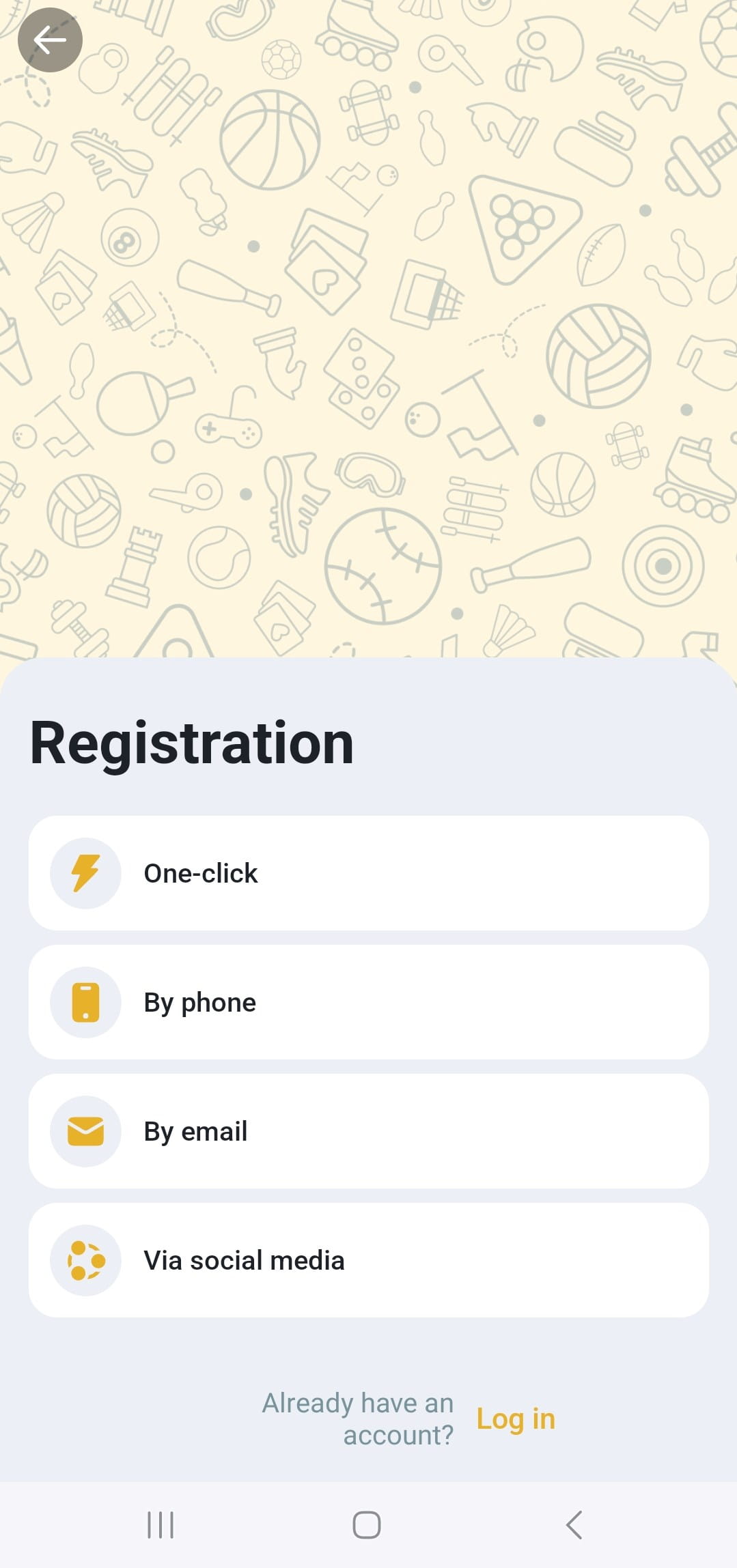
- Launch the Mel bet app on your device and tap the Register button on the home screen.
- Choose a registration method. Melbet offers multiple sign-up options: one-click, by phone, by email, social networks.
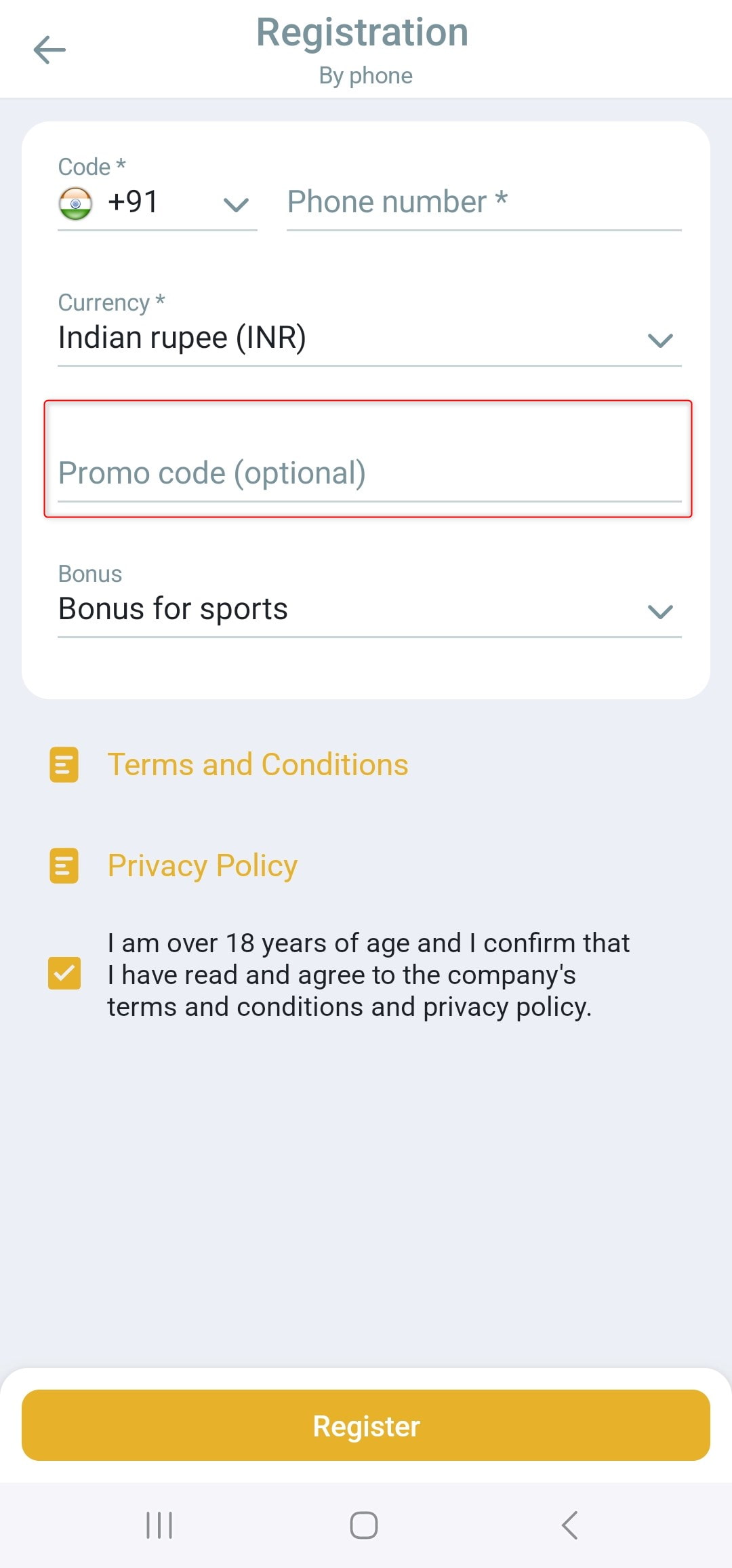
- There is a “Promo Code” field during signup. For example, enter ml_179352 here to boost your welcome bonus.
- Select your preferred welcome bonus.
- Check the box to confirm you are 18+ and accept the terms and conditions.
- Hit the Register button.
The Melbet app login process after the registration is simple – just use your details to access your account anytime.
Melbet Bonuses for First-Time Users
- Sports Welcome Bonus: New bettors can claim a 100% First Deposit Bonus on their first deposit. This bonus matches your first deposit amount up to ₹20,000 for Indian players. The minimum deposit to qualify is ₹75. Before you can withdraw winnings, you have to wager 5x the bonus in accumulator bets with at least 3 selections at minimum 1.40 odds each. You have 30 days to meet the wagering.
- Casino Welcome Bonus Package: Instead of a one-time bonus, the casino welcome package is spread over your first few deposits. Currently, it’s advertised as up to ₹315,000 + 220 Free Spins in total. It spreads across the first three deposits.
- 1st Deposit: 100% match bonus up to ₹135,000 + 50 free spins,
- 2nd Deposit: 150% match up to ₹90,000 + 70 free spins,
- 3rd Deposit: 200% match up to ₹90,000 + 100 free spins.
Casino bonuses have their own wagering requirements (e.g., 40x turnover within 7 days for each bonus).
- “Royal Monday” Bonus: Every Monday, if you deposit, you will get a 100% bonus on the first deposit of the day, up to ₹8,000 – ₹8,500. The minimum deposit to get this bonus is around ₹400. You have to wager this bonus 6 times in accumulator bets within 24 hours.
- Bonus for App Users: You can get a Weekly 10% Cashback on sports bets placed through the Melbet India app. For instance, if throughout the week you placed a total bet of ₹5,000 via the app, you’d get ₹500 back. This cashback has no wagering requirements.
- Cashback on Losses: Players can get back up to 3% of their lost bets on sports on a weekly basis. You need to have a loss of at least ₹100 to be eligible, and the max cashback is ₹85,000. It has no wagering requirement.
Activate Promo Code on Melbet
If you’re signing up as a new player in 2025, you’re in luck – we have an exclusive promo code that can boost your welcome bonus beyond the standard offer.
- Use promo code ml_179352 when registering.
- Entering ml_179352 increases the first deposit sports bonus by 50% for new players. The normal sports welcome bonus is 100% of your deposit. So with the code, you get 150%.
- Simply type ml_179352 in the “Promo Code” field during the sign-up process.
- You should see the bonus credited at the increased rate after registering and making your first deposit.
- Why Should You Use the Promo Code? It’s simply extra value at no cost. The code gives you a bigger bonus than the standard new user.
Easy Betting Methods in Melbet
- Launch the Melbet apps and log into your account. Ensure you have deposited funds in your account.
- From the home screen or menu, go to the Sports section (or Live if you want in-play bets). Tap your desired sport and find the competition or league.
- Once you find the league, tap on the specific match or event you want to bet on. This will open the betting markets for that event.
- When you find a bet you want to place, tap on the odds. This selection will automatically be added to your bet slip.
- Tap on the bet slip to expand it. Here you’ll see your selected bet.
- In the bet slip, there’s a field to enter your stake (the amount of money you want to bet). Enter the amount in INR.
- If you have added multiple picks, ensure you choose the correct bet type – e.g., “Accumulator” (parlay) if you want them all to win together, or “Single” if you want to place individual bets on each selection.
- Hit the “Place Bet” button on the bet slip and the bet will become active.
You can find your bet in the My Bets or Bet History section if you want to double-check.
Types of Sports You Can Bet On
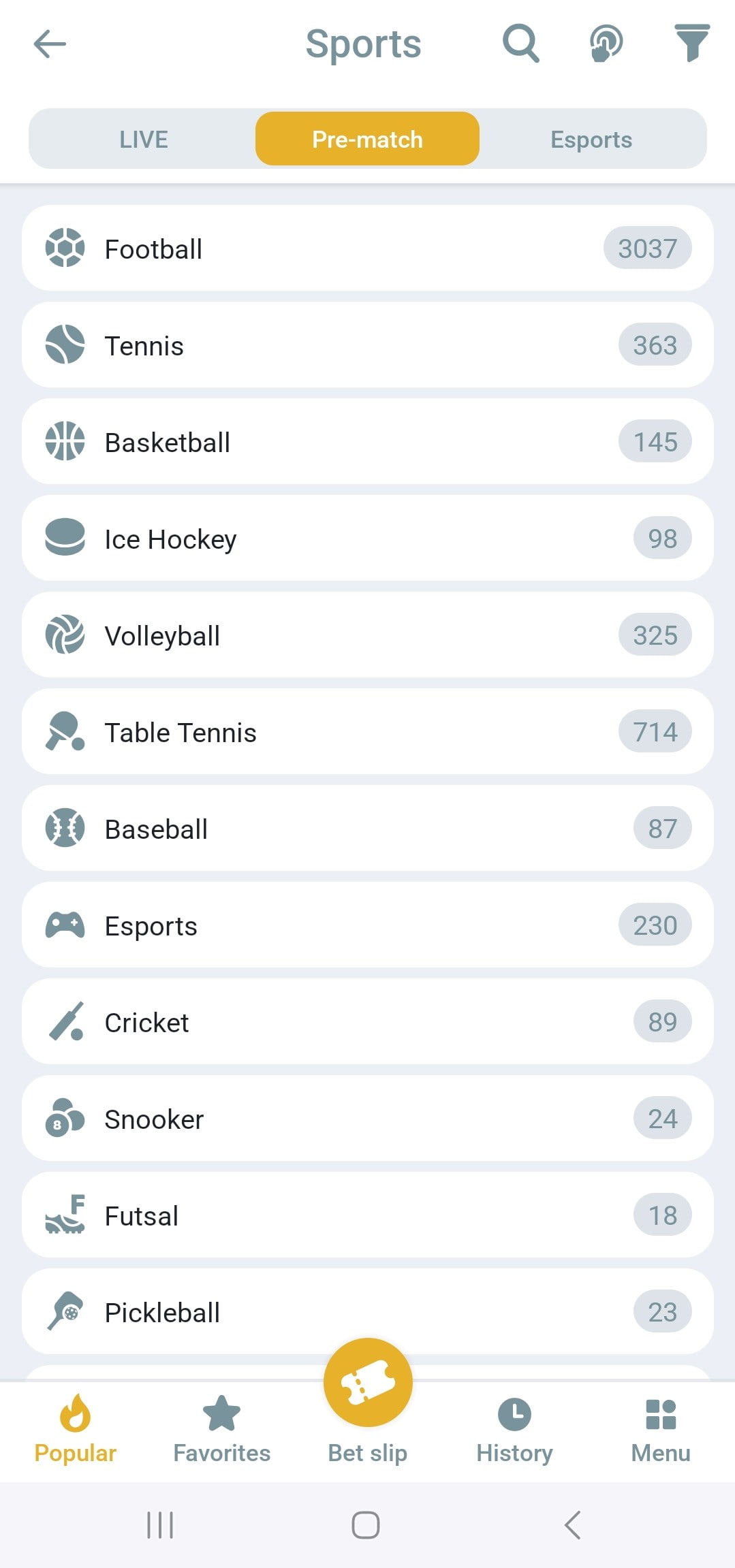
The platform has over 40 sports categories – each with numerous leagues/events. Below are the sports available for betting.
Football Betting
You’ll find hundreds of matches daily in the football section. Key leagues and tournaments available are:
- English Premier League, La Liga (Spain), Serie A (Italy), Bundesliga (Germany) – all top European club leagues.
- UEFA Champions League and UEFA Europa League
- Indian Super League (ISL)
- FIFA World Cup, UEFA Euro Cup, AFC Asian Cup
- Other leagues: French Ligue 1, MLS (USA), Brazilian Serie A, etc.
IPL, T20, and Other Cricket Leagues
Cricket is arguably the most popular sport in India, and Melbet’s cricket app has a rich range of competitions:
- Indian Premier League (IPL)
- ICC World Cups: The ODI World Cup, T20 World Cup, and Champions Trophy.
- Bilateral Series: Test, ODI, and T20 series.
- Other T20 Leagues: Big Bash League (BBL) in Australia, Pakistan Super League (PSL), Caribbean Premier League (CPL), Bangladesh Premier League (BPL), etc.
- Domestic/Franchise cricket: England’s T20 Blast, The Hundred, South Africa’s SA20, etc.
- Asia Cup and other multinational tournaments.
NBA, EuroLeague, and More
The major basketball events you can bet on are:
- NBA (National Basketball Association): Every game of the NBA season is available.
- EuroLeague.
- Other Leagues: NCAA College Basketball, Australia’s NBL, FIBA World Cup, Olympics basketball tournament, etc.
Apart from NBA and EuroLeague, other sports are:
- Tennis: Grand Slams (Wimbledon, US Open, etc.), ATP/WTA tours, Davis Cup, etc.
- Hockey: NHL, KHL (Russia), and international events.
- American Football: NFL and NCAAF college football, with Super Bowl outrights and more.
- Esports: Dota 2, CS:GO, League of Legends, Valorant, etc.
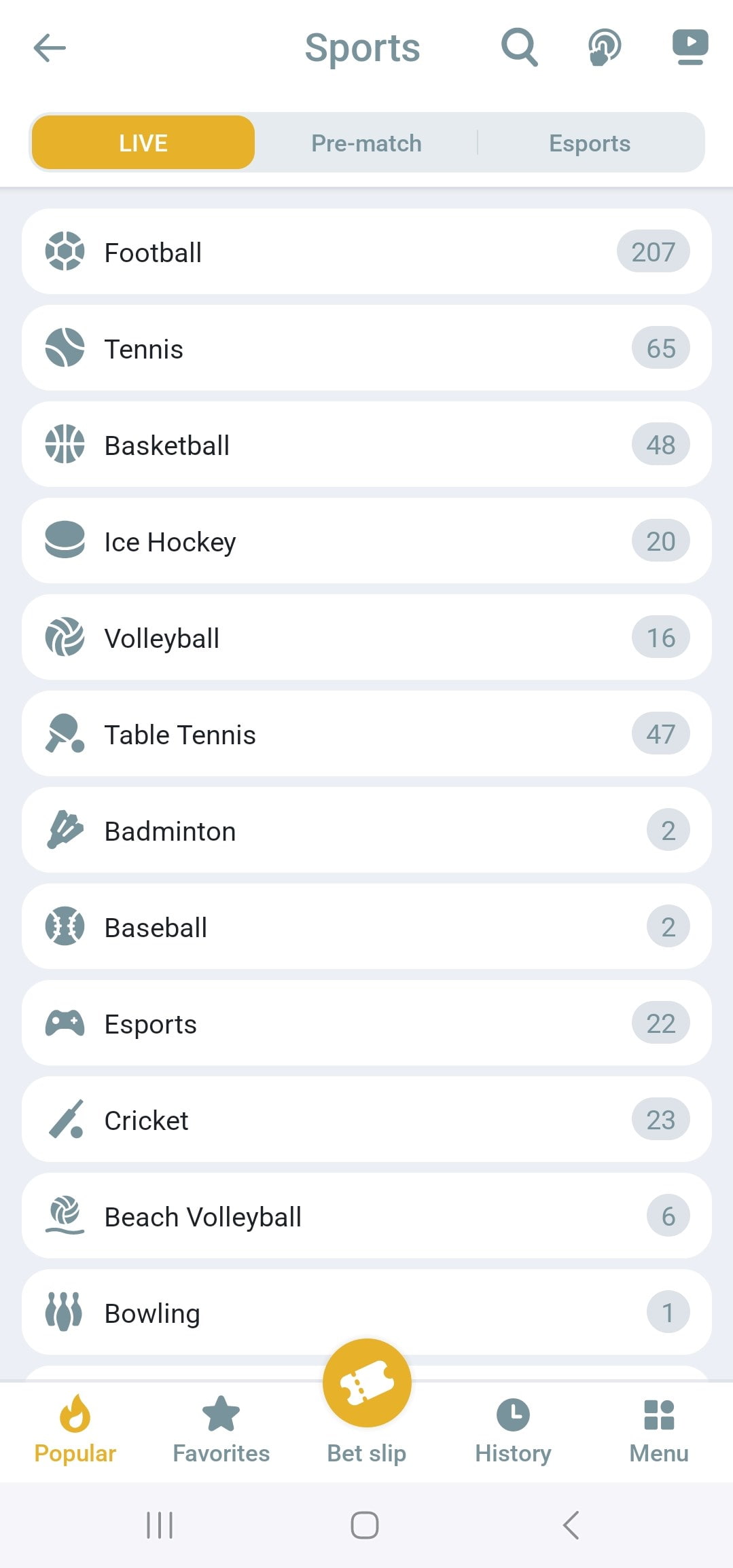
Live Betting Features in Melbet
- Wide Range of Live Events: There are often 1,000+ live events to bet on per day across all sports.
- Dynamic Odds: Odds update in real time as a game progresses.
- Live Match Tracker: There is a live animation or infographic that shows the current state of play for most sports.
- Live Streaming: Melbet offers live streaming for many events directly in the app.
- Bet Types in Live: In live mode, you can bet on many of the same markets as pre-match – plus some special live-only markets.
Multi Live: In Multi Live, you can add several live events to one screen and monitor them all at the same time. You might add an IPL match, an NBA game, and a live roulette table. This way, you don’t need to switch back and forth – all chosen events and their main odds are visible together.
Supported Sports for Live Betting: All major sports are covered:
- Live cricket
- Live football
- Live tennis
- Live kabaddi, badminton, etc.
- Esports live betting.
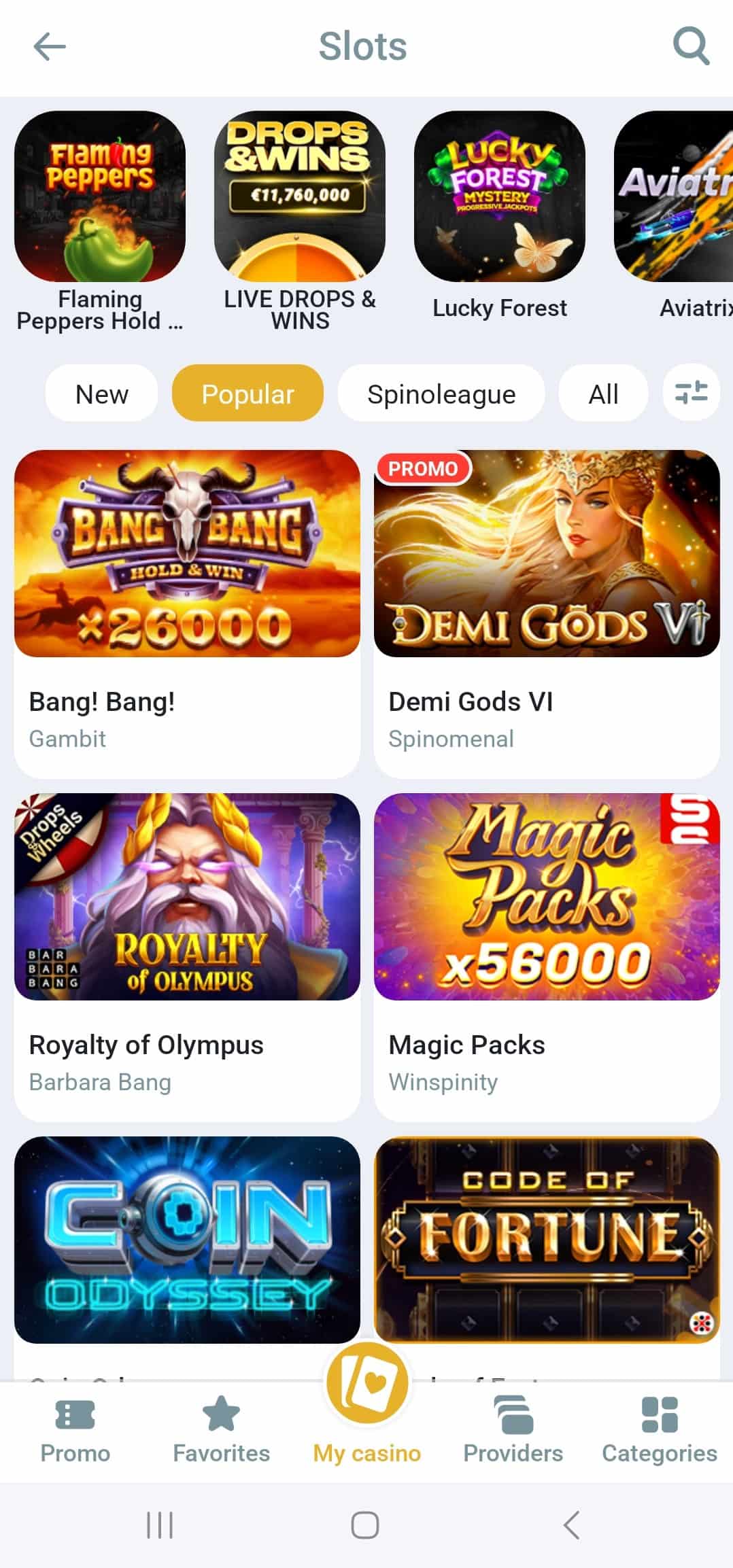
Casino Games Available in Melbet
Huge Variety of Slots: The platform has at least 10,000 mobile-friendly slot games in its library.
Table Games: All classic table games are available in virtual format. These include:
- Roulette
- Blackjack
- Baccarat
- Poker & Video Poker
- Others
Jackpot Games: There is a section for progressive jackpot slots and some lottery-style jackpots.
Live Casino with Real Dealers: Melbet has over 600+ live dealer tables. You can join live games such as:
- Live Blackjack
- Live Roulette
- Live Baccarat
- Live Poker
- Game Shows
- Andar Bahar & Teen Patti
Melbet App License and Regulation
The Melbet app is backed by proper licensing and strong security measures:
- Licensed Bookmaker: It operates under a gambling license issued by the Government of Curacao.
- Data Encryption: The platform uses SSL encryption to protect user data.
- Secure Transactions: It supports secure payment methods and stores your payment details in tokens rather than plain text.
- Account Security: It allows features like two-factor authentication (2FA) for logging in.
- Fair Play: For casino games, the use of certified RNGs and the live dealers being from reputed providers ensures games aren’t rigged.
- Privacy: The platform’s privacy policy states that they do not share personal data with unnecessary third parties and they comply with data protection laws.
- Stability: It is well-maintained and handles live streams and multiple bets simultaneously without issue.
Safe and Fast Payment Options
Melbet excels in providing a diverse array of payment options for Indian users:
Instant Deposit Options
Here are the deposit methods popular in India and how to use them:
- UPI (Unified Payments Interface): You can deposit via UPI apps like PhonePe, Google Play, Paytm UPI, WhatsApp Pay, BHIM, etc. Payments are credited instantly.
- Paytm Wallet: Select Paytm, input the deposit sum, and you’ll either log in to your Paytm to approve or get a link to pay.
- PhonePe Wallet: Similar to Paytm, PhonePe can sometimes be used if listed.
- Netbanking (Internet Banking): The platform allows deposit via direct bank transfer or netbanking for many Indian banks.
- Bank Cards: Visa/MasterCard credit or debit cards are accepted in some cases.
- E-Wallets: Skrill, Neteller, Jeton, AstroPay, and others are supported.
- Payment Systems: There might be options like MoneyGo, ecoPayz, Perfect Money, or similar.
- Cryptocurrency: For the tech-savvy, Melbet accepts crypto deposits.
Withdrawal Methods Available
Melbet provides multiple avenues to withdraw your winnings:
- UPI / IMPS: You can often withdraw directly to your bank.
- Paytm Withdrawal: If you deposited by Paytm, Melbet might allow withdrawal to Paytm wallet.
- Neteller/Skrill: Withdrawals from e-wallets like Skrill or Neteller are very fast.
- Cryptocurrency: You can withdraw in crypto too. You will get the crypto equivalent of your INR amount.
- Bank Transfer: If nothing else, the default is bank transfer.
How to Contact Support
- Live Chat (24/7): The fastest way is via live chat. It is directly accessible in the app or on the website.
- Telephone Support: Melbet provides a 24/7 toll-free phone number (0008004430067) for Indian players.
- Email Support: If your issue is not urgent or requires you to send documents, email (info-ind@melbet.com, for Indian bettors) might be convenient.
- Callback Request: You can submit your number and name and the team will call you back to assist.
- Help Section / FAQ: You might also check the FAQ in the app or website before contacting support. They address common questions which can save you time.
Support for Indian players is offered in English and Hindi at least.
Final Verdict on Melbet App
After thorough testing, this is our Melbet app review:
It offers a large selection of sports and markets, a loaded casino platform, and a rich live betting offering (including streaming). The user experience is smooth. There are local Indian payment methods to ensure smooth transactions. The presence of Indian-focused bonuses and promotions is a big plus.
The app is backed by a Curacao license and strong security measures.
No app is without minor areas to improve. In Melbet’s case, having to update the Android app manually is a slight inconvenience, but not uncommon for betting apps (since the Play Store route isn’t available).
FAQ
How to download the Melbet app in India?
For Android, go to the official website and find the “Download for Android” link. Tap to download the Melbet APK, then install it. For iPhone users, open the App Store and search “Melbet”, then download.
What devices does the Melbet app work on?
On Android, it can run on any smartphone or tablet with Android 5.0 or above and at least 1 GB RAM. On iOS, it’s compatible with iPhone and iPad devices running iOS 12.0 or later.
Can I use the Melbet app on my computer?
Yes, there is a desktop app for PC and Mac. If you prefer not to use this, you can always use the website on your computer’s browser.
Does the app offer live betting?
Yes, live betting is one of Melbet's core offerings. You can bet in real time on ongoing matches across various sports – cricket, football, tennis, etc.
What deposit methods are available in the app?
You can deposit via UPI, which is one of the fastest ways. Other options are Paytm wallet, bank cards, Netbanking, e-wallets, and cryptocurrencies.
What are the advantages of the app compared to the mobile version of the website?
First, the Melbet mobile app is faster. Second, it allows push notifications, which the browser can’t do. Third, it provides a more neat interface (no browser address bars or distractions). There is also biometric login.



